A Modern Web Editor for the S-330, Roland’s Underdog 80’s 12-bit Sampler
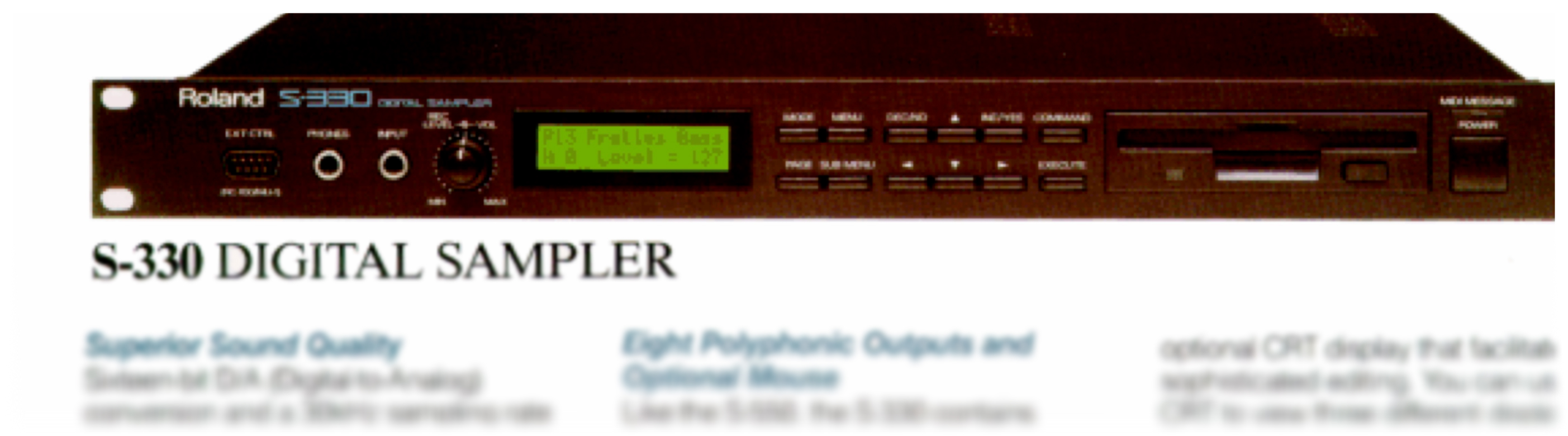
The Roland S-330 is one of those pieces of vintage gear that punches well above its weight. Released in 1987, this compact 1U rack sampler packed serious sound-shaping capabilities into an affordable package. Nearly four decades later, its distinctive 12-bit character continues to attract musicians looking for that unmistakable late-80s sampling warmth. But there’s been one persistent obstacle to truly unlocking its potential: the control hardware.
A Brief History
The S-330 arrived at a pivotal moment in sampling history. Digital sampling was transitioning from exotic studio luxury to accessible creative tool, and Roland positioned the S-330 as the affordable entry point to their S-series sampler line.
Despite its single rack unit size, the S-330 offered impressive specifications:
- 16-voice polyphony with 8-part multitimbral operation
- Variable sample rates from 15kHz to 30kHz at 12-bit resolution
- Up to 28.8 seconds of sampling time
- Powerful resonant low-pass filter with dedicated 4-stage envelopes (4 levels, 4 rates)
- LFO with sine and peak-hold waveforms
- 8 individual outputs
- Composite video output for external monitoring
The S-330 shared its sampling engine with the larger S-550, and the same architecture later appeared in the W-30 sampling workstation. The S-series distinguished itself through a graphical editing interface displayed on an external video monitor and controlled via mouse or remote controller.
The Control Hardware Problem
Roland designed the S-330 for editing through an external display and pointing device. The sampler outputs a composite video signal showing parameter screens, waveform displays, and graphical envelope editors. Navigating this interface requires one of the following:
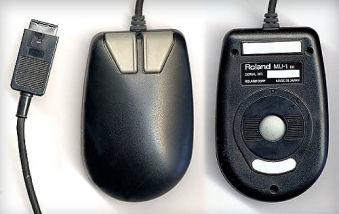
The Roland MU-1 Mouse: An MSX-compatible mouse manufactured by Mitsumi for the MSX home computer standard. These mice use a proprietary protocol incompatible with PC, Amiga, or Atari mice. Working originals are rare and expensive.
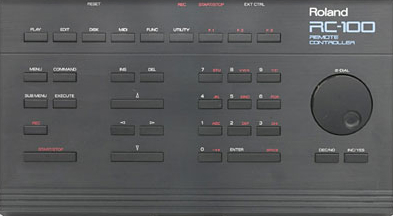
The Roland RC-100 Remote Controller: A dedicated control surface with buttons and a jog wheel mapped to sampler functions. The RC-100 is extremely rare.
MSX-Compatible Mice: Some third-party MSX mice (such as the Philips SBC 3810) work, but the MSX computer standard has been obsolete for decades, making these difficult to find.
Without compatible control hardware, editing is limited to the S-330’s front panel—a small LCD and minimal buttons that make detailed parameter editing impractical.
DIY solutions exist, including Arduino-based mouse emulators, PS/2 adapters, and Windows control software. These require hardware construction, specific software configurations, or dedicated computers.
The audiocontrol.org Web Editor
The S-330 Web Editor communicates directly with the sampler from your browser—via MIDI System Exclusive messages—the same protocol Roland included for computer-based editing. The editor runs in a web browser, requiring only a standard MIDI interface connection to the S-330.
Communication
MIDI SysEx: The editor reads and writes sampler parameters in real-time using Roland’s SysEx protocol. Changes appear immediately on both the hardware and the web interface.
Bidirectional Sync: Parameters edited in the browser update on the S-330, and changes made on the hardware’s front panel are reflected in the editor.
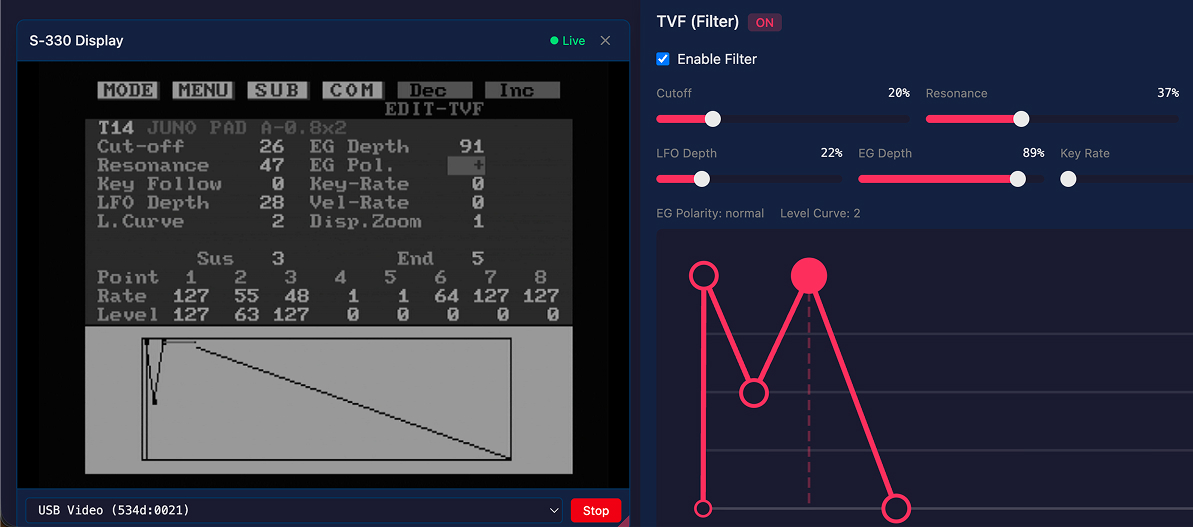
Video Display Integration: A USB video capture device connected to the S-330’s composite output allows the editor to display the sampler’s native screen alongside the modern interface.
Virtual Front Panel: The editor includes a virtual representation of the S-330’s front panel buttons for menu navigation and parameter adjustment. Keyboard shortcuts allow navigation using arrow keys and function keys, making it possible to control the sampler’s native UI without a mouse.
Editor Organization
The interface loosely follows the S-330’s organizational structure while taking advantage of the UX benefits afforded by modern web applications:
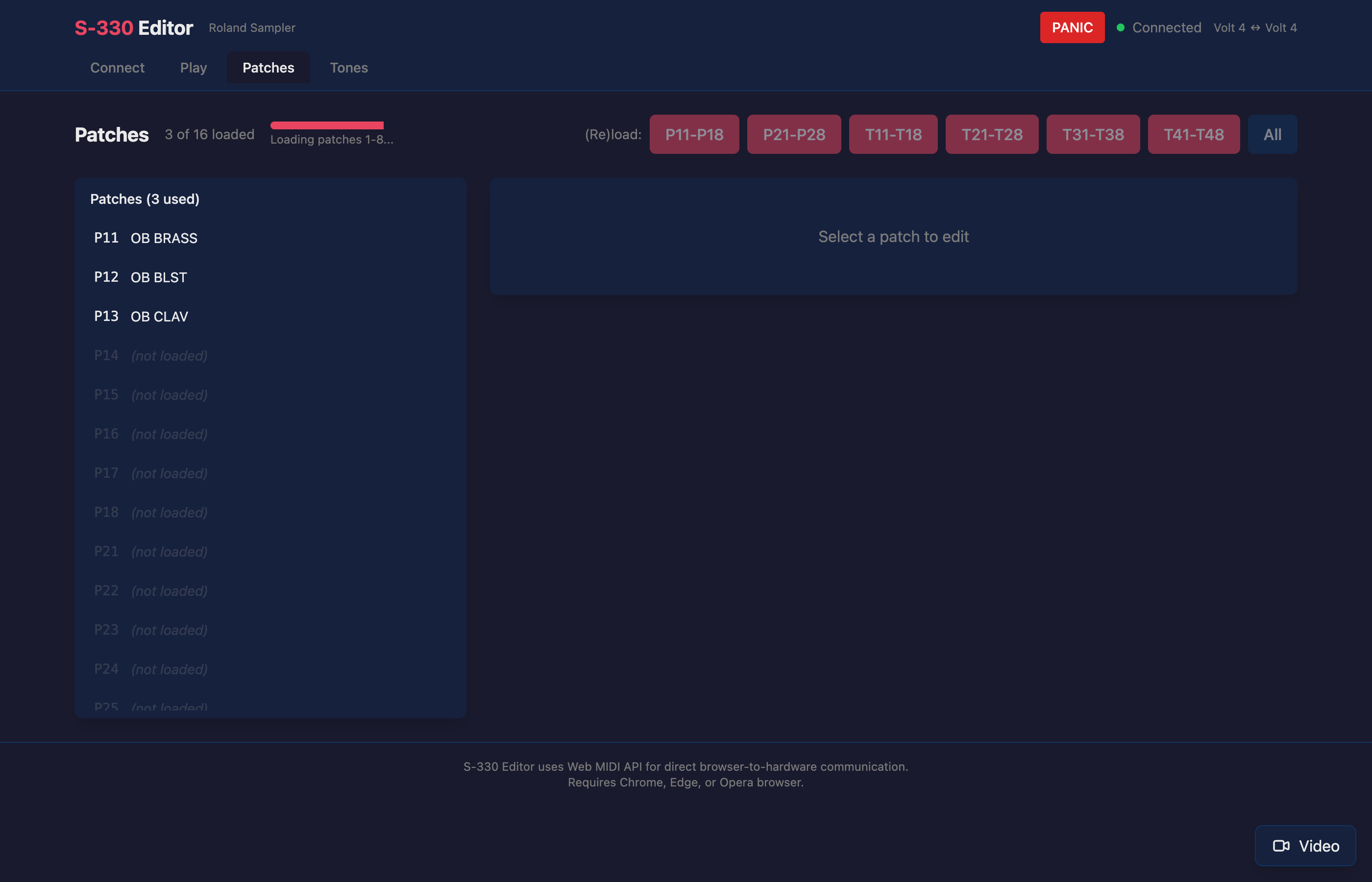
Patch Editor
Each patch contains up to 16 tone zones mapped across the keyboard. The patch editor displays keyboard mappings with controls for key range, velocity response, and tone assignment.
Tone Editor
Each tone contains sample parameters including filter settings, envelopes, LFO configuration, and wave data references. The tone editor presents these with visual envelope displays.
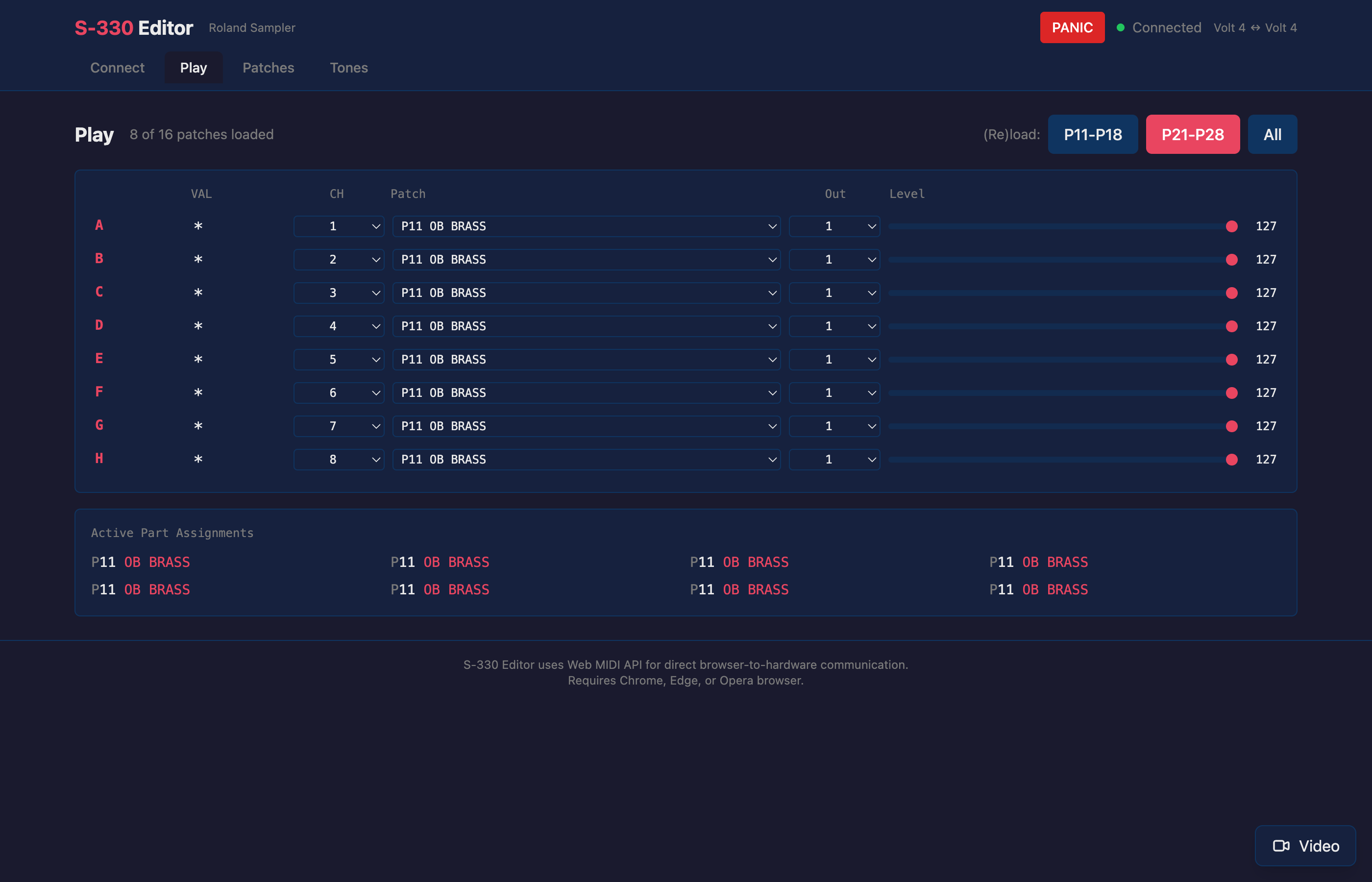
Play Mode Editor.
A performance view for using the S-330 as an instrument.
Native UI vs. Web Editor: The Best of Both Worlds
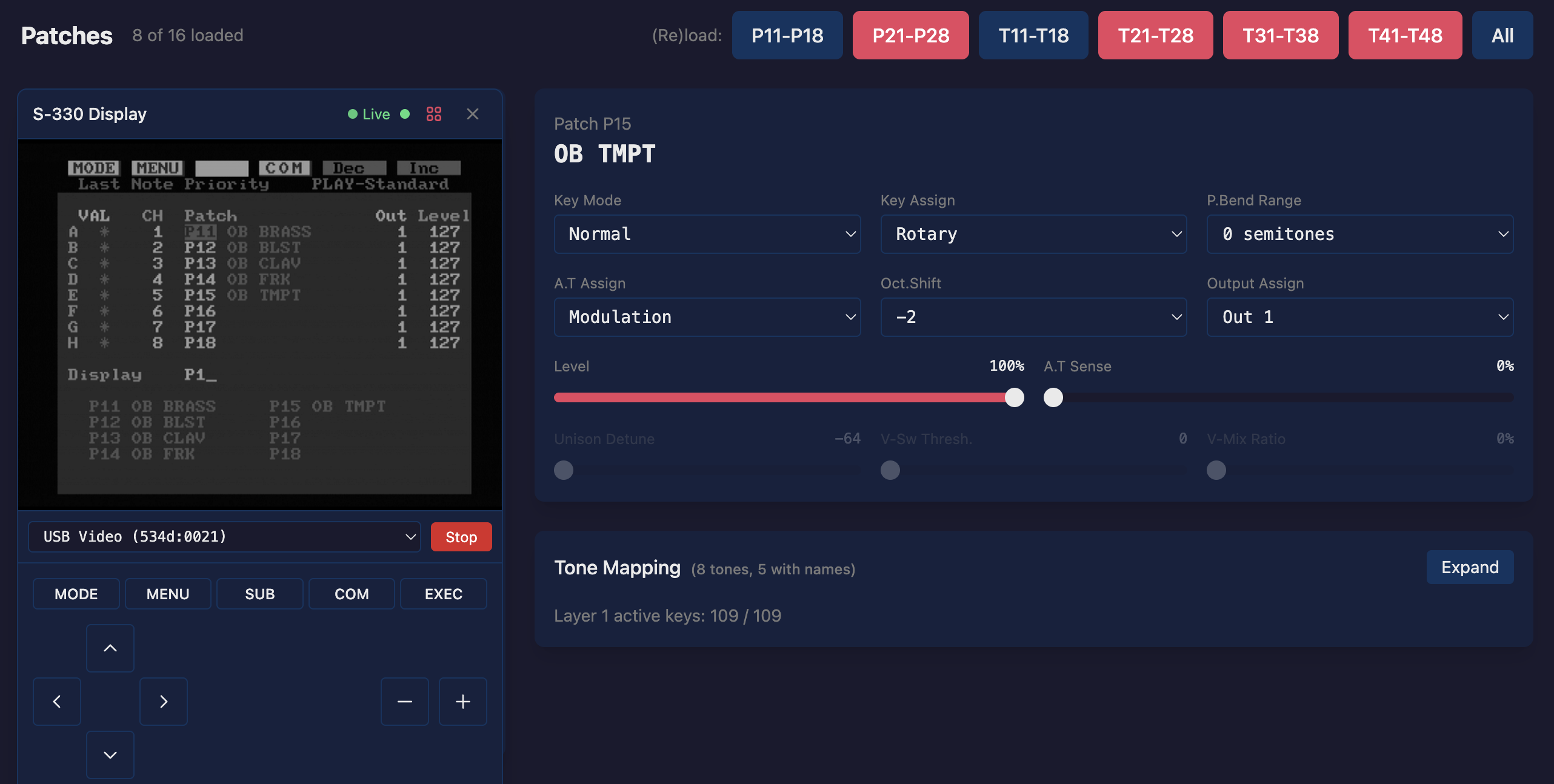
The S-330’s native interface and the web editor each have distinct strengths. The web editor doesn’t replace the native UI—it complements it, and having both visible simultaneously offers workflow advantages neither provides alone.
Editing with the Native Sampler UI
The S-330’s built-in interface follows a menu-driven workflow with parameters spread across many separate screens.
Consider editing a Tone—the core sound-shaping unit containing filter, envelope, and modulation settings. First, open the Mode Menu and select EDIT. Then choose which parameter category to adjust: Loop for sample start/end/loop points, LFO for modulation settings, TVF for filter parameters, TVA for the amplitude envelope, or Tone Map for a grid overview. Each category is a separate screen. To adjust the filter cutoff and then tweak the amplitude envelope, you navigate to TVF, make your changes, return to the menu, select TVA, and navigate to that screen.
Switching between Tones requires opening the Sub Menu to display the Tone List—all 32 tones with their names and types (Original vs. Sub)—then selecting a different one. Copy, swap, and initialize operations live in the Command Window, accessed via the COM button and confirmed with EXECUTE.
Patch editing follows the same pattern: Mode Menu → EDIT → choose Patch PRM, Split, or Patch Map → navigate parameters → Sub Menu to switch Patches → Command Window for copy/swap operations.
This interface is logical once learned, but shaping a sound means constantly moving between screens: adjust the filter attack on the TVF page, check how it interacts with the amplitude envelope on the TVA page, tweak the LFO depth on the LFO page, return to Loop to adjust the sample start point. Each step requires backing out and navigating forward again. Without a mouse or RC-100, you’re limited to the front panel’s small LCD and buttons—functional, but slow.
Editing with the Web Interface
The web editor presents all parameters on a single scrollable page with direct access to any value. Click a slider, drag an envelope point, or type a number. There’s no menu hierarchy to traverse. The visual layout groups related parameters logically: filter controls together, envelope stages visible at a glance, LFO settings in one place.
Changes sync immediately to the hardware. Adjust a filter cutoff in the browser and hear the result instantly from the S-330’s outputs.
The Combined Advantage
The web editor’s video capture integration means you can view the S-330’s native display embedded directly in the browser window alongside the modern controls. This combination offers several benefits:
Visual Confirmation: The native display shows exactly what the sampler is doing internally. When you adjust a parameter in the web editor, the S-330 receives and applies the change immediately—you’ll hear the difference. The native screen doesn’t always auto-refresh when values arrive via SysEx, so you may need to navigate away and back (or tap an arrow key) to see the updated value displayed. A minor quirk, but far better than doing everything through the native UI alone.
Access to Native-Only Features: Some S-330 functions, particularly sampling and disk operations, aren’t exposed via SysEx. The embedded native display with virtual front panel controls lets you access these functions without leaving the browser or walking across the room to the hardware.
Learning the Hardware: For users new to the S-330, seeing both interfaces simultaneously helps build understanding of the sampler’s architecture. The web editor’s clear labeling maps directly to what appears on the native screen.
Flexible Workflows: Some editing tasks suit the web interface—tweaking filter envelopes, comparing tone settings, bulk parameter changes. Others are faster in the native UI—quick patch selection via the Sub Menu, executing copy operations. With both visible, you use whichever fits the task.
No Mode Switching: Traditional software editors require choosing between the software interface and the hardware display. Here, both are present continuously. Glance at the native screen to check the current menu context, then adjust parameters in the web editor, then use the virtual front panel to navigate to a different screen—all without changing windows or reconnecting cables.
The S-330’s native interface was well-designed for its era. The web editor doesn’t obsolete it—it removes the hardware barriers that made it inaccessible and presents both interfaces together as a unified editing environment.
Requirements
- Roland S-330 sampler
- MIDI interface connected to your computer
- Web browser with Web MIDI support (Chrome, Edge, or Opera)
- Optional: USB video capture device for display integration
The editor is available at audiocontrol.org/roland/s330/editor.
About the Project
The S-330 Web Editor is open source. The editor and supporting libraries are available on GitHub.
Related Content
- What’s New in the S-330 Editor — February 2026 update
- Roland S-330 Overview — detailed specs, accessories, and the web editor
- The Roland S-Series Samplers — a guide to the full S-series lineup
- Roland MU-1 Mouse Guide — history, compatibility, and alternatives
- Roland RC-100 Remote Controller Guide — the dedicated control surface
- Roland S-550 — the full-featured 12-bit rack sampler
- Roland W-30 — the S-series sampling workstation
- S-330 Web Editor Documentation — setup and usage guide